Tool Execution
Arif can use approved tools to search records, inspect business context, generate files, create or update records, send supported notifications, and work with connected systems. Tool access depends on the user's Qriib permissions and the organization's enabled connectors.
How Tool Execution Works
Arif does not simply trust a model-generated action. Before a tool runs, the request is checked against tool schemas, Qriib permissions, and safety policy. Write-like operations can be allowed, blocked, or sent to the user for approval.
What Users See
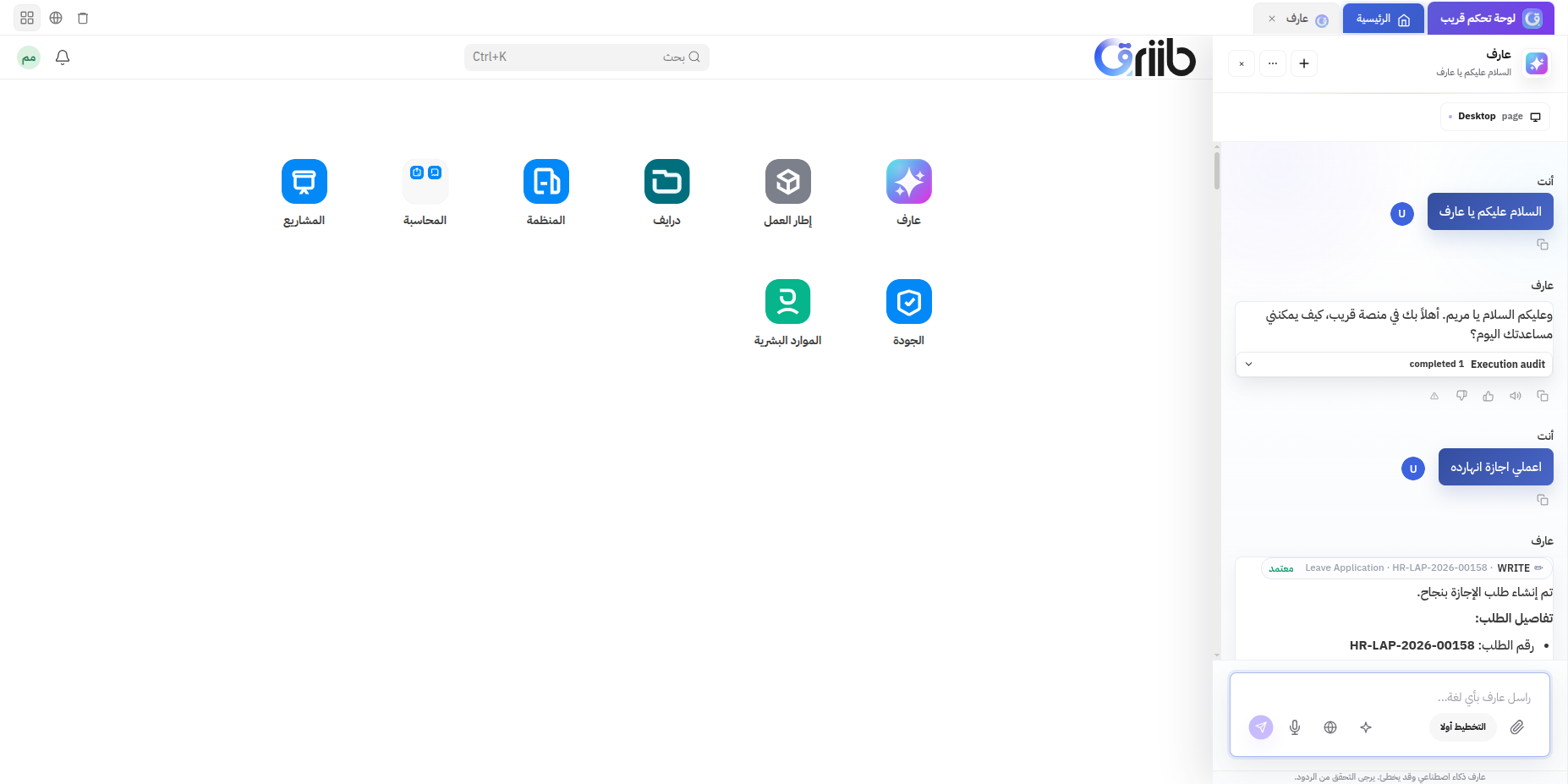
When a tool runs, the chat can show:
- The action Arif is attempting.
- Progress while the tool is running.
- Whether the tool succeeded or failed.
- Created or changed record names when available.
- Approval cards for sensitive actions.
- Undo controls for supported changes.
Read and Write Behavior
Read-only tool calls can be used to gather context, search records, or inspect setup. Actions that change business data use stricter handling and may require approval before they run.
If a tool fails, Arif should report the failure clearly and can retry with corrected inputs when appropriate. For partial completion, users can decide whether to continue, accept the result, or roll back supported changes.
Permission Model
Arif respects Qriib's role-based access. A user can only use tools for records and actions they are already allowed to access in Qriib. Connector tools can also be limited by administrator configuration.